Since September 16, 2026, Brazil's National Institute of Industrial Property, INPI, has allowed national patent applications and PCT national phase entries under service 200 to be filed directly through the Patent Services Module. The main operational change is that issuing and paying the Federal Revenue Collection Guide, known by its Portuguese acronym GRU, is now part of the electronic form workflow itself. This reduces the need to leave the filing environment to generate the fee guide in advance through the PAG system.
The change is still part of a transition. INPI has kept PAG and the Electronic Filing system available so users can adapt gradually. In practice, a user who already generated a service 200 GRU in PAG may, under certain conditions, reuse it in the new module, while the older systems remain in operation during the migration period.
What changed in the new patent filing process
The second version of the Patent Services Module expanded a platform that already offered a workspace for monitoring patent cases. With the September 2026 update, the system began supporting patent application filing, including national applications and PCT national phase entry, as well as the issuance and payment of annuity fees.
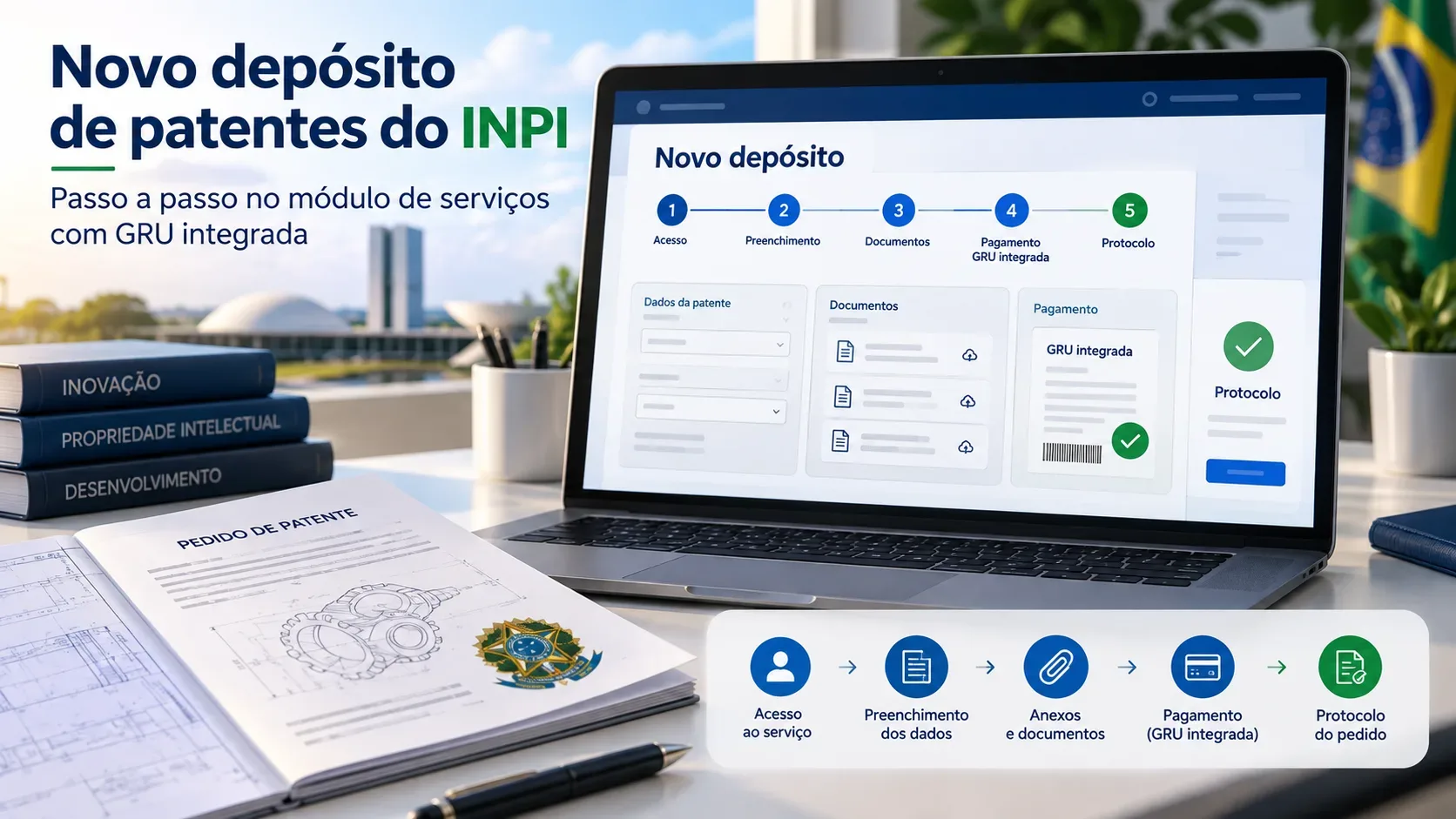
For filing, the most visible difference is GRU integration. The user completes the form, enters application data and documents, and reaches the payment stage without leaving the module. INPI states that the GRU can be generated there and paid online. A service 200 GRU previously issued in PAG may also be used, provided that it has not already been used for filing and that the payer is authorized in the case.
Checklist before starting
- Access: open the Patent Services Module and complete the authentication required by the system.
- Applicant registration: check that the data are correct. The module primarily queries the PAG, or e-INPI, database. If a CPF authenticated through GOV.BR has no previous PAG registration, the system may retrieve data from Brazil's Federal Revenue Service.
- Registration corrections: applicant registration data cannot be edited directly in the new module. If there is a discrepancy, the correction must be made in e-INPI or, where applicable, with the Federal Revenue Service.
- Technical documents: prepare the files that make up the application, such as the description, claims, abstract, drawings when applicable, and any other documents required for the specific situation.
- GRU payer: confirm who will pay the fee. Issuing the guide depends on identifying the applicant or, when an attorney or agent is involved, an authorized applicant, under the CPF or CNPJ conditions described by INPI.
- Previous GRU: if a service 200 guide has already been issued in PAG, confirm that it has not already been used for filing and that the payer is authorized before attempting to reuse it.
How the Patent Services Module workflow works
1. Access the module and start a new filing
The electronic form brings the filing stages into a single sequence. INPI's official tutorials cover access to the system, selection of the application type, applicant and inventor data, priority claims when applicable, technical documents, and specific information for cases involving biological sequences, biological material and genetic heritage.
2. Complete applicant and application data
Applicant registration data are retrieved from databases connected to INPI and GOV.BR. Because the module itself is not the place to correct registration details, discrepancies should be identified before moving forward. During completion, the user also provides the technical and administrative information required for the chosen filing type.
3. Attach the documents
The system accepts application documents and, for part of the workflow, can process DOCX files and automatically convert them to PDF. INPI reports a technical limit of 6 MB for this conversion. If a DOCX file exceeds that capacity and processing fails, the official guidance is to convert it on the user's computer and upload the PDF directly.
INPI also notes that an abstract uploaded directly as a PDF may present limitations for automatic text extraction. If automatic reading of the title or abstract fails, those fields can be corrected manually before submission. When applicable, INPI recommends using its standardized DOCX templates.
4. Choose between a new GRU and an existing GRU
At the final stage, the user can generate the service 200 GRU within the Patent Services Module or select the option to use an existing GRU. To reuse a guide created in PAG, the user must enter the GRU number and comply with the conditions stated by INPI.
Guides previously generated in PAG may appear in the Workspace under My Requests with issued status. From there, the user can use the filing completion function when the guide is eligible.
5. Pay and complete the filing
When a new GRU is generated in the module, online payment is available. According to INPI, the payment deadline rule remains linked to the filing date as indicated by the system. A physical proof of payment does not need to be attached to the initial filing because payment validation is performed electronically with the banking network.
After submission, the system provides the protocol number, the patent application number and a single document combining the filing form and all attachments.
Integrated GRU: what changes in practice
| Situation | What to do |
|---|---|
| You have not yet generated the service 200 GRU | Complete the application in the new module and generate the GRU within the same workflow, with online payment available. |
| You already generated the GRU in PAG | Use the existing GRU option, provided that the guide has not already been used for filing and the payer is authorized in the case. |
| You want to review guides and filings | Open My Requests in My Workspace, where the module brings together guide status, drafts and filed petitions. |
| Payment has not yet been validated | Check the status shown by the system and INPI's instructions. Banking integration performs electronic validation. |
Have the old systems been discontinued?
No. INPI states that PAG and the Electronic Filing system remain available during the adaptation period. This coexistence is intentional: it allows users to migrate gradually to the new environment and enables certain GRUs already issued in PAG to be reused.
INPI has announced a third version of the Patent Services Module for November 2026. The plan is to extend filing to other patent services and move forward with the gradual shutdown of the Electronic Filing system. Because INPI itself says that dates and further guidance will be confirmed through official channels, this future stage should be treated as an announced timetable, not as a completed migration.
Drafts, simultaneous use and tracking
The new module allows multiple drafts of service 200 to be created and kept. They can be named and resumed through My Requests. However, each form must be opened, edited and completed individually. The same form cannot be filled out simultaneously through multiple accesses.
INPI has also stated that it is developing a feature for secure transfer of form completion between users. Until that feature is actually available, teams working collaboratively should coordinate who has the form open to avoid simultaneous editing attempts.
Checks before filing
- Review applicant and inventor information before submission.
- Confirm that attached documents are the final versions intended to form part of the application.
- Check that the GRU belongs to the correct workflow and that the payer is authorized.
- Do not confuse the GRU due date with other legal deadlines in the patent procedure.
- Keep the protocol and application numbers and monitor the case through the environment indicated by INPI.
- Review updated manuals, tutorials and FAQs before completing operations that depend on specific requirements.
What this step-by-step guide does not replace
The Patent Services Module simplifies the electronic procedure, but it does not eliminate the legal and technical requirements of a patent application. Drafting claims, defining the scope of protection, assessing novelty and inventive step, planning priority strategy and preparing technical documents may require specialized analysis. This guide explains the operational use of the system based on available official instructions and does not replace technical or legal advice.