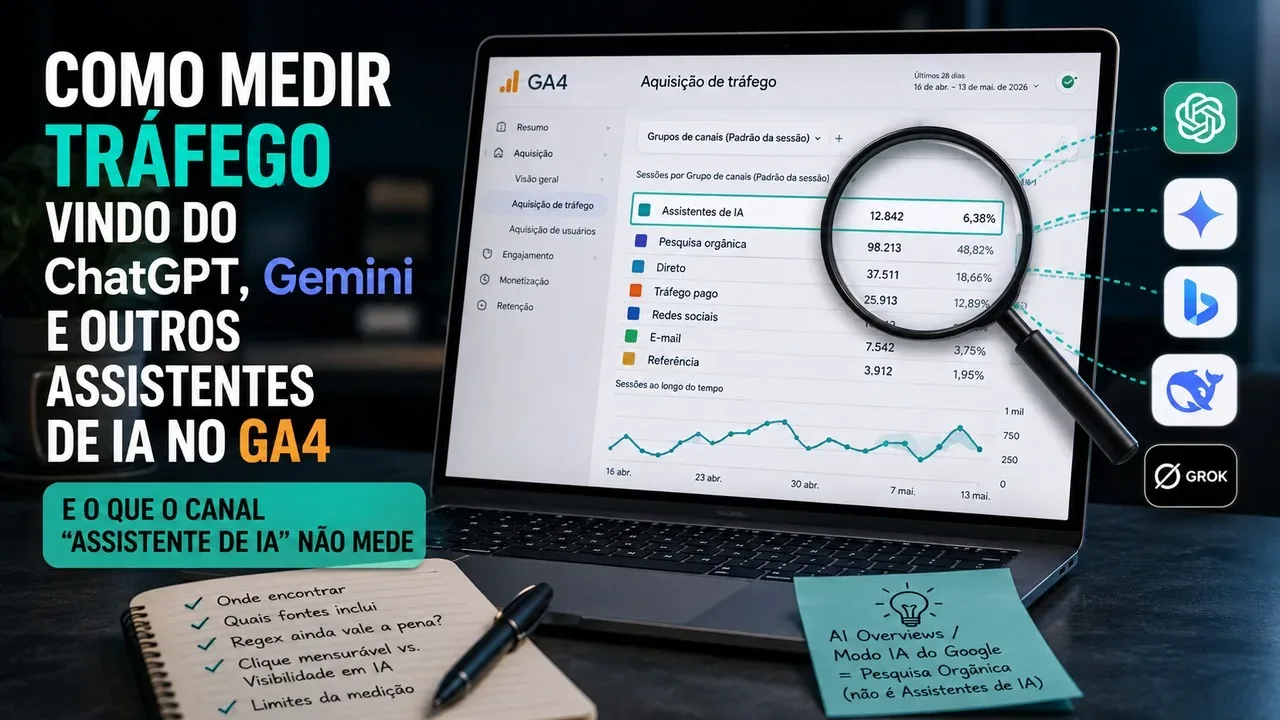
As of May 13, 2026, measuring visits from AI assistants in Google Analytics 4 has become simpler. GA4 now has a native channel for this traffic in the default channel group. In practice, anyone who just wants to know how many sessions reached the site after a click in an assistant recognized by Google doesn't need to start by creating their own regex.
The change, however, does not transform GA4 into an “AI visibility” measurement tool. The channel records traffic that actually reaches the website and depends on acquisition signals, especially from the recognized referrer. A quote from your brand in a response, a non-click recommendation, or an impression within an AI experience does not become a session in Analytics.
What changed in GA4 with the AI Assistants channel
Google announced the new measurement on May 13, 2026. When the referring URL matches a recognized AI assistant, Analytics can assign the ai-assistant medium and classify the visit in the AI Assistants channel of the default channel group.
Current channel group documentation cites ChatGPT, Gemini, DeepSeek, Copilot and Grok as examples. The release note also mentions Claude. The expression used by Google is equivalent to “sources like”, so these names should be read as examples of recognized sources, not as a list that the user must maintain manually.
This difference is important because, before native channel, it was common to create a custom channel group with a regex to capture domains from ChatGPT, Gemini, Copilot, Claude, Perplexity, and other services. This technique continues to exist, but it is no longer the mandatory starting point for basic measurement.
Where to find AI traffic in GA4
To track visits, the most useful way is the Traffic Acquisition report. It works in the scope of the session, that is, it shows where each session started in the analyzed period came from.
Open Reports, go to Acquisition and then Traffic Acquisition. In the main dimension, use the session's default channel group and look for the AI Assistants row. Depending on the interface language, the label may appear translated from AI Assistants.
To find out which service is behind the total, open the breakdown by session source or session source/medium. Thus, the channel works as the aggregate view and the source helps to separate, when data is available, the traffic associated with different assistants.
Traffic acquisition and user acquisition do not answer the same question
The Traffic Acquisition report is best suited when the question is “how many sessions were arrived by AI assistants in this period?”. User Acquisition works with the origin of the first user and answers a different question: “through which channel did this user first arrive?”.
Mixing the two scopes can produce different numbers without an error. A user may have originally been acquired by Organic Search and, on a later visit,
return via a ChatGPT link. In this case, the first origin and the current session origin are not the same thing.
Gemini, AI Overviews and AI Mode should not be placed in the same bucket
One of the easiest things to misinterpret is treating any Google product with AI as if it belonged to the AI Assistants channel. The GA4 documentation makes an explicit separation.
Clicks coming from sources like Gemini can be classified as AI Assistants when the referrer is recognized. Clicks originating from AI Overviews and Google Search AI Mode are excluded from this channel and entered into Organic Search.
This means that a drop or rise in AI Assistants does not alone account for site performance across all generative experiences. An important part of Google's own AI experience remains mixed into the organic search channel in GA4.
Do I still need to create a custom regex or channel group?
For the basic question, no. If the goal is to track the total number of sessions that Google recognizes as coming from AI assistants, the native channel should be the first reference. Creating a custom copy just to reproduce the same classification increases the chance of maintaining two competing definitions for the same phenomenon.
A custom group can still be useful when there is a need that the standard definition does not solve. This is the case of a company that wants to group only a subset of origins, include domains that are not being classified as expected, or maintain its own business rule for auditing and historical comparison.
Google's own documentation even shows how to create a custom assistant channel using regex. It also warns that the expression needs to be updated when URLs or the list of services change. Furthermore, the order of the channels matters: traffic enters on the first channel whose definition matches the available data.
There is another useful point for those who already had an old configuration. Custom channel groups can be applied retroactively in reports, so your own definition can still be used to analyze previous periods under the same criteria. This is no reason to keep a regex forever, but it may justify its existence during a transition or audit.
What the AI Assistants channel doesn't measure
The channel measures traffic, not editorial presence within an AI response. If your site was cited, summarized, or recommended and no one clicked, there is no session for GA4 to record. Therefore, zero visits on the channel does not mean zero exposure to assistants.
There is also no universal metric on this channel for how many times your domain appeared in replies, in which position it was mentioned or which prompt led to the mention. GA4 observes behavior after the user arrives on the website; he doesn't see the entire previous step within the wizard.
Classification still depends on whether the traffic arrives with information that matches the Analytics rules. If the referrer is not recognized as an AI source, the session can be classified on another channel based on available signals. Therefore
a source that does not appear in AI Assistants should not be automatically interpreted as no traffic.
How to measure visibility in AI without confusing it with sessions
For generative experiences within Google Search, Search Console now offers a generative AI performance report. The current documentation states that it includes impressions from AI Overviews and AI Mode and that this data belongs to the Web search type.
This report addresses a visibility question: on which pages and clippings the site is appearing in Google Search's generative experiences. GA4 is for another step: what happens when someone clicks and enters the site.
As of August 2026, Google itself reports that this Search Console report is still gradually being made available and may not appear on all properties. Where available, it helps separate two things that were previously very easy to mix: impression in Search's generative features and session registration on the site.
For external assistants like ChatGPT or other independent services, GA4 remains primarily a post-click measurement tool. Any “AI viewability” analysis needs to consider data that exists before the click, when the platform makes it available, or a separate observation methodology. There is no overall count of mentions or replies on the AI Assistants channel.
A practical flow for deciding what to use
First: confirm the native channel
Start in Traffic Acquisition and see if AI Assistants appears in the session's default channel group. This is the reference number for traffic that GA4 was able to classify under its current rules.
After: open the session source
Use origin or session origin/medium to find out which sitters are contributing to the total. This analysis is often more useful than creating a new channel just to separate ChatGPT from Gemini, because the source dimension itself can already provide this granularity.
Only then: look for a real gap
If there is known traffic that is not entering the expected channel, compare origin, medium and period. From there, evaluate whether a custom group adds a necessary rule. The regex should solve an identified gap, not be created out of habit.
Separate traffic from visibility
Use GA4 for sessions, engagement, key events, and post-site results. For AI Overviews and AI Mode, also use Search Console when the generative AI report is available. Don’t add these metrics together as if they were the same thing: one is exposure in search; the other is behavior on the site.
How to interpret numbers without drawing greater conclusions than the data allows
If AI Assistants grows in GA4, the safe conclusion is that measurable classified traffic in that channel has increased within the time period and rules used by Analytics.
This does not, in itself, prove that your brand has been cited more often by AI models nor that your “AI visibility” has increased at the same rate.
The reverse also applies. If the channel has little volume, there may be little click generation, little recognized ranking, or simply a lot of dead-end exposure for your site. The data is useful precisely when the question is restricted to what it can answer.
In practice, the 2026 change simplified measurement: use the native AI Assistants channel for recognized traffic, open the source to understand who sends visits, and maintain a regex only when there is a proven additional need. And when reviewing AI products from Google Search, remember that AI Overviews and AI Mode remain in Organic Search in GA4. This separation avoids comparing incompatible metrics and makes acquisition diagnosis much more reliable.