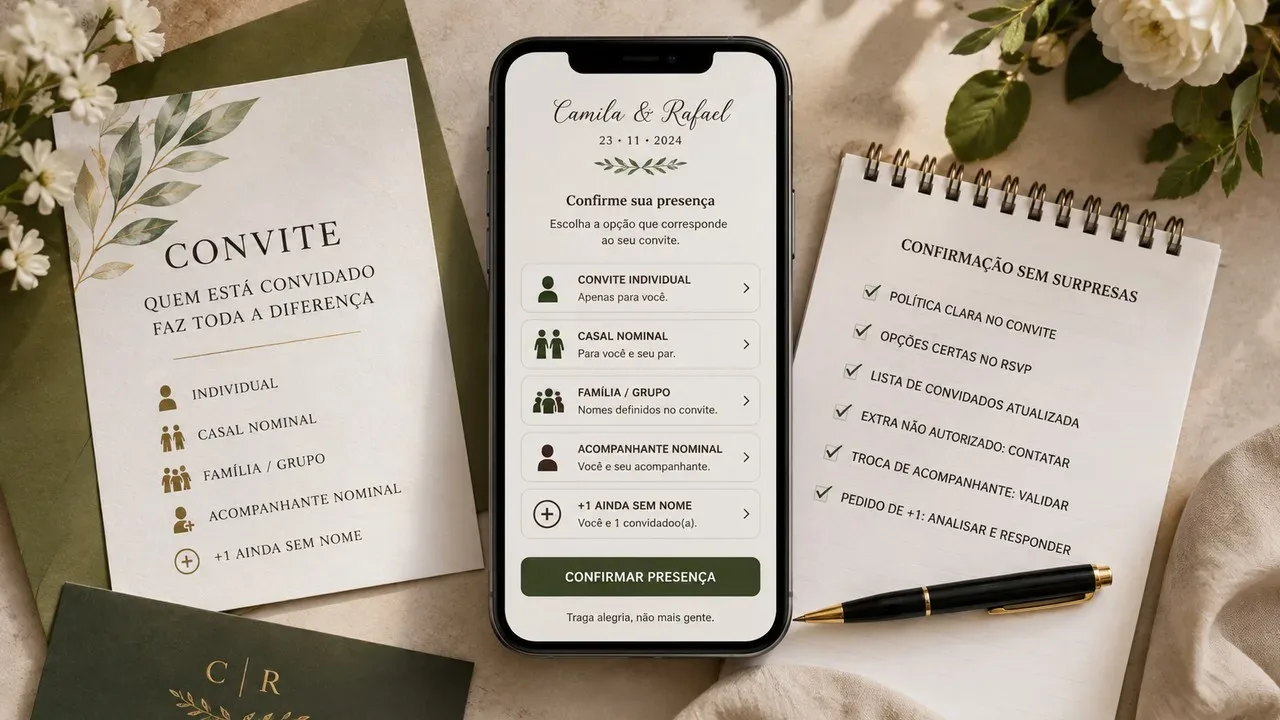
The problem does not start with the confirmation form. It starts when the invitation communicates one rule and the RSVP allows another. If a person receives an apparently individual invitation, but finds an open field for “how many guests will go”, the tool ended up expanding the list without the hosts noticing. The safest course is to treat the invitation, RSVP and guest list as three versions of the same decision.
The central rule is simple: first define who is authorized to attend; then write the invitation with the same scope; Finally, configure the RSVP to accept only the expected people or vacancies. Invitation and confirmation platforms often separate family groups, companions and +1 limits precisely because these cases represent different permissions, and not just different ways of writing a name.
Before writing the invitation, set the invitation unit
“Invitation unit” is the group of people who share the same presence authorization. It can be a single person, a couple, a family with defined names or a person with the right to take someone. This definition needs to exist before the invitation text, because it is what determines how many confirmations the system should accept.
A common mistake is to put together the list with just one name per contact and leave it up to the guest to inform how many people will be attending. This transfers to the person receiving the invitation a decision that should have been made by the hosts. If the event has controlled capacity, the number of places should not be inferred from a free field.
Another mistake is to use “escort” for different situations. When you already know who the second person is, the clearest thing to do is to invite them by name. “+1” makes more sense when there is an additional authorized vacancy, but the name of who will occupy it has not yet been defined.
Scenario 1: invitation to an individual
How to write on the invitation
Use the person's name and avoid terms that suggest automatic extension of the invitation. “Marina Alves” or “Marina, we are waiting for you to celebrate with us” makes the unity of the invitation clear. If the style of the event requires an explanatory message, it can reinforce that the invitation is personal, but this does not need to come across in a harsh or defensive way.
What RSVP should allow
The form should locate this person and only offer their confirmation. It should not ask how many companions she will take, nor display a quantity selector above a vacancy. If the tool has closed confirmation by list, search by name or individual link, this is a good case to use the restriction.
What to record on the list
Register a person and a vacancy. If there are fields for group, family or authorized quantity, keep the individual unit. Observations such as dietary or telephone restrictions belong to the person's record, but do not change authorization to be present.
Scenario 2: nominal couple
How to write on the invitation
When both people are known and invited, write both names. “Marina Alves and Pedro Lima” is more accurate than “Marina and companion”. The second format may imply that the vacancy belongs to Marina and can be filled by anyone, which does not correspond to the nominal invitation.
What RSVP should allow
The ideal is for both names to appear linked to the same invitation or group, with the possibility of confirming each presence separately. This makes it possible to record real situations, such as one person attending and the other not, without turning the couple into an indivisible response.
What to record on the list
Register two people within the same invitation unit. If the platform uses groups or families, keep a common identifier for the couple. The final list must preserve individual names because food, accreditation, table and communication may depend on each person.
Scenario 3: defined family or group
How to write on the invitation
If all the members have already decided, choose to name them or use a familiar greeting that corresponds exactly to the registered group. “Família Souza” can work on the front of the invitation, as long as the RSVP shows which people are included. When there is a risk of doubt—for example, adult children, children, or relatives living together—individual names are safer than a broad label.
What RSVP should allow
The form must only present the expected members of that group and allow the answer to be made per person. In systems that allow one person to be responsible for the rest of the family, this facilitates confirmation without changing the number of places. The important point is that the person responsible for the response does not gain the power to add members who were not registered.
What to record on the list
Keep each guest as their own record and associate them all with the same invitation unit. This prevents “Família Souza, 4 people” from becoming an opaque block. If a member refuses, you still know who confirmed, who won't go and how many spots actually remain occupied.
Scenario 4: nominal companion
How to write on the invitation
This case happens when the main person and the companion are already known, even if the organization wants to maintain a main contact. The invitation must contain both names. In terms of authorization, it works like a nominal couple: the second slot belongs to that specific person, not to an interchangeable companion.
What RSVP should allow
Show both names and accept one answer for each. Avoid the “companion name” field if the companion has already been defined. Asking for this name again creates the impression that it can be freely replaced.
What to record on the list
Register the main guest and companion as separate people, linked to each other. If you need to identify who received the invitation or who the reference contact is, use a separate administrative field. Don't turn this relationship into a generic +1 vacancy.
Scenario 5: +1 authorized, but still unnamed
How to write on the invitation
There is, in fact, an open position here. The communication may say “Marina Alves + 1 companion” or “Marina, your invitation includes a companion”. The goal is to make it clear that there is an additional authorized position without assuming who the person will be.
What RSVP should allow
The system can release an extra space and request the name of the companion if Marina confirms that she will take him/her. The limit needs to be set to one additional person, not a free amount. If the event requires specific data from the companion, such as full name or dietary restrictions, collect this information at the time of confirmation.
What to record on the list
Before responding, register a +1 vacancy linked to the main guest. After the name is entered, replace the generic description with the person's name or create the corresponding individual record, preserving the link. This makes the final list usable for accreditation and avoids registrations as “Marina's companion”.
Nominal invitation and +1 are not the same thing
The most important difference in this process is to separate the invited person from the authorized vacancy. When you write two names, you are inviting two specific people. When you write “+1”, you are giving the main guest the right to choose who will occupy a second place, within the rules of the event.
This distinction resolves most of the doubts about changing companions. If the second person was invited by name, changing the name is not just editing a registration: it is asking for a change in the composition of the invitation. If it was an open +1, changing the name normally does not change the authorized quantity; just update who will occupy that vacancy.
It also helps to avoid an uncomfortable situation: inviting “Marina and Pedro” and then discovering in the RSVP that Marina replaced Pedro with someone else because she understood the second vacancy as transferable. If the intention was to invite the couple by name, the form should reflect this.
The free field should not create new vacancies
Observation fields are useful for messages, dietary restrictions and additional information. They should not function as a gateway for extra guests. If someone writes “I'm taking my sister” in a note without there being an authorized vacancy, the system should not automatically add that person to the confirmed total.
The safest treatment is to separate “response received” from “vacancy approved”. The main guest confirmation remains valid, but the additional name remains as a pending request until the hosts decide. This separation protects the event count and prevents an annotation from being interpreted as authorization.
When the platform allows you to control the number of companions by invitation, prefer this setting to a generic question like “how many people will go?”. The open question is simple for the guest, but weak for management when the event has invitations with different limits.
What to do when an unauthorized companion shows up
If the guest enters an extra name, respond objectively and privately. A possible message is: "We have received your confirmation. Your invitation is reserved for you, without an additional guest. Therefore, we are unable to include the name provided at this time." If there is a real chance of opening the vacancy later, say that the request will be subject to availability, without promising approval.
Registration must continue with the originally authorized quantity. Do not increase the committed total until the exception is approved. If approved, first update the RSVP list and permission; only then communicate the change as confirmed.
This procedure avoids two conflicting records: a form saying two people and an official list saying one. The source of truth needs to be the guest policy reflected in the registration.
How to deal with escort exchange
When the invitation includes +1 without a name, the exchange is an identity update within the same vacancy. Confirm the new name, replace the previous one and maintain the authorized quantity. If the event collects individual data, ask for the new companion's information and invalidate the previous companion's.
When the companion was nominal, treat the exchange as a request. The response can be accepted or rejected according to the event policy, but must not occur silently on the form. If the organization decides to allow substitution, update the invitation, registration and RSVP so that the three tiers match again.
How to respond to a subsequent +1 request
Requesting an escort after sending the invitation is common because the guest's personal situation may change. The decision belongs to the hosts and must follow the same rule used in the original list. A short answer often works better than a long justification.
If there is no space, say that the invitation was planned for the people already indicated and that it will not be possible to add a companion. If there is a possibility of review, let them know that you will check availability and respond later. Avoid verbally giving a +1 and leaving the form locked, as this creates a real second channel.
When the exception is approved, register the new vacancy before asking for confirmation. If the system offers an individual limit on companions, increase only that invitation. This way, the exception does not become a global permission for other guests.
Public link, closed access and individual link
The invitation address also influences clarity. A public link makes sharing easier, but may circulate outside the originally invited group. This is not necessarily a problem when RSVP requires identification and enforces list limits, but deserves attention in capacity-controlled events.
When the tool offers closed confirmation, search by name, code or individual link, these features help connect the person who opens the form to the invitation they actually received. The benefit is not just avoiding undue access; is to upload the correct number of places for that invitation to the RSVP.
If you use a general link for the entire event, do not let authorization depend solely on the text of the message sent on WhatsApp. The form still needs to recognize who is confirming and how many people that inviting unit can register.
The final conference before sending out the invitations
Before the shot, choose some test invites that represent the five scenarios and go through the flow as if you were the guest. Open the individual invitation and check if a single vacancy appears. Open the couple and see if both names are available. Test family, nominal companion, and open +1. The goal is to detect any differences between the text received and the options displayed in the RSVP.
Also check out what the list looks like after a partial answer. In a couple, for example, one person may accept and the other may refuse. In a family, some people can confirm
and others are not. If the panel only records “confirmed group”, you lose precision precisely when you need to close the buffet, seats and accreditation.
The best configuration is not the one that offers the most fields. It's the one that turns the guest policy into an experience that's impossible to interpret in two ways. Invitation, RSVP and list need to tell the same story: who was invited, how many vacancies there are and who actually confirmed.