Opening the manager and finding dozens of overdue tasks creates an immediate temptation: select everything and play for today. The problem is that this doesn't retrieve the list. It just exchanges a pile of late payments for a day that is impossible to meet. To trust the system again, each pending issue needs to receive a new decision, not just a new date.
The central idea is simple: first find out if the due date was a real deadline or just an intention to do that day. Then decide if the task still makes sense, if it fits within the time available, if it needs to be broken down into parts and if it really deserves a new date. The objective is not to clear the delay screen in a few minutes. It's transforming what was left behind into a list that represents reality again.
Stop mass rescheduling
When twenty overdue tasks move to today with one click, the calendar fails to answer the most important question: what really needs to happen today? The new date does not represent priority, deadline or capacity. It only serves to hide the delay until tomorrow.
Self-imposed dates can work as a commitment, but they lose value when they are used for everything. If each task is given a day just so it doesn't run out of date, the system starts to produce artificial urgency. The practical effect is known to those who keep rescheduling: today's list becomes large, few tasks are completed and the rest receive another equally arbitrary date.
Recovering the list requires accepting that some pending issues do not need a date, others need to be divided, some have already lost their meaning and only one part deserves to occupy the current day.
First separate actual deadline from planning date
A date can have two different meanings. The first is deadline: there is a concrete consequence if the task is not completed by that moment. It could be sending a document, a registration that closes, a bill that comes due or a delivery arranged with another person.
The second meaning is planning: you chose to work on the task that day, but nothing external stops working if it is moved. Reviewing photos, organizing a folder, studying a topic or coming up with an idea can be important without having a real deadline.
Mixing these two things is one of the main reasons a list seems more urgent than it really is. Some current managers already treat planned date and deadline as separate concepts. Even when your application doesn't make this distinction, it's worth keeping it in mind: a deadline is a commitment; Planning date is your choice.
If the task has a real deadline and it has already passed, the question changes. It may be necessary to conclude today, renegotiate delivery or set a new specific date. If the old date was just planning, you don't need to come up with another day right away. The task may return to an undated queue until a better decision is made.
Use a decision tree for each due task
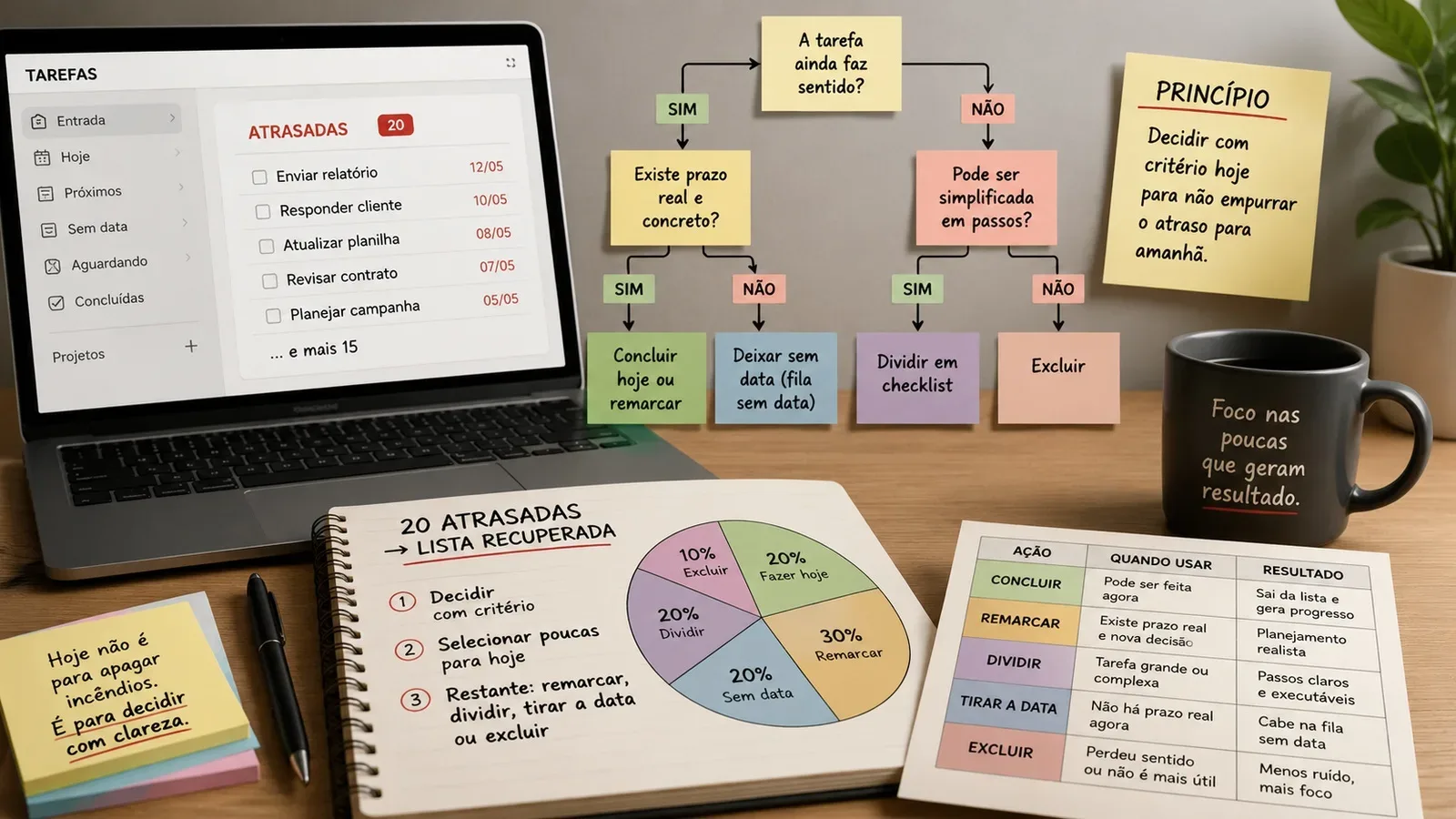
Instead of looking at the twenty issues as a block, review them one at a time. The first question is: does this task still make sense?
If the answer is no, delete. A task may have lost its usefulness because the event passed, the need disappeared, someone else took care of the matter, or you simply decided not to do it anymore. Keeping this item on the list does not preserve liability; preserves noise.
If it still makes sense, ask if there is a real and concrete deadline. When there is, determine the next possible decision. It could be concluding now, negotiating with those who depend on delivery or rescheduling for a date that has a reason. The important thing is that the new date represents a real decision.
If there is no deadline, look at the size of the task. Something like "organize company documentation" may be weeks past due because it's not a one-time action. In this case, it is not enough to reschedule. Transform work into actionable steps, such as finding documents, separating pending issues and sending the first necessary file. The task name needs to make it clear what the next action is.
When the task makes sense, has no deadline and doesn't need to happen now, removing the date is a valid decision. It remains in the system, but leaves the artificial competition for space on the calendar.
What really goes into today
Today's list must be built on ability, not guilt. Before moving any to-do to the current day, consider how much work time there really is after meetings, commutes, routines and unforeseen events.
Start with commitments with a real deadline or immediate consequences. Then, choose a few high-value issues that fit into the available ranges. A long task can take up almost all of your day's capacity; three short tasks may be more realistic. There is no universal number. The limit is how long you can actually run.
A good check is to imagine the end of the day. If completing everything you're marking as "today" would require working at a pace you don't normally sustain, the list is already born late. Reduce before you start.
It is also worth avoiding using priority as a synonym for urgency. An important task may remain undated if there is still no commitment to carry it out today. Priority helps you decide what deserves attention when there is capacity; the date tells you when you decided to act.
When to divide into checklist
Late tasks with vague verbs often hide too much work. "Prepare presentation", "arrange travel", "resolve tax" and "review project" seem like actions, but they can require several decisions before something is completed.
In these cases, turn the task into a small project and record observable steps. "Prepare presentation," for example, might turn to open the latest data, choose the top three charts, write the opening message, and review the final slides. You don't need to put every step on the calendar. You can keep the set in checklist and only schedule the next action that will actually be executed.
Dividing is not used to produce a larger list. It serves to reduce ambiguity. When the next action fits into a work session and begins with a concrete verb, it becomes easier to assess whether it goes in today or goes back to the queue.
When to take the date
Leaving a task without a date does not mean forgetting it. It means admitting that it remains relevant, but does not yet have a temporal commitment.
This option is especially useful for ideas, improvements, readings, research, small maintenance and tasks that you want to do when the opportunity arises. If they remain on fictitious dates, they will appear late repeatedly and compete with real deadlines.
The condition for a dateless queue to work is review. It needs to be consulted periodically so that important items can be prioritized or given a date when there is context. Without revision, "no date" becomes an archive. With review, it becomes an organized reserve of things that still make sense, but don't need to put pressure on the calendar.
When to reschedule
Rescheduling is correct when some information has changed and you have made a new decision. A client will send the file on Thursday; a meeting was moved; you set aside Friday morning to perform a task; the deadline was renegotiated. In these cases, the new date has a reason.
Rescheduling just because the task is due is not a decision. It is automatic postponement. If you find yourself changing the same task for the second, third, or fourth time without making any concrete changes, stop choosing dates. Reclassify the item: perhaps it needs to be divided, perhaps it has no real deadline, or perhaps it is no longer worth the effort.
An example: 20 delays become a recovered list
Imagine a Monday with twenty tasks due. Instead of moving the twenty to today, you review them one by one.
Four items lost their meaning: a purchase that is no longer necessary, a message about an event that has ended, a search replaced by another source and an adjustment that is no longer requested. These four are excluded.
Five tasks remain useful, but have no real deadline. They return to the undated queue: organizing old photos, reading a supplementary report, testing an idea, reviewing notes and improving a file folder.
Three items are too large to be treated as one action. Each one becomes a checklist with clear next steps. Instead of "organizing documents", for example, the first step is "separating July invoices".
Five pending issues receive new dates because there is a concrete decision: two depend on people who will respond on specific days, one has renegotiated delivery and two were reserved in real blocks of the week.
There are three tasks left that fit today and have a reason to be today. The result is not a miraculously empty list. It's better: twenty late ones became four excluded, five without a date, three divided, five rescheduled with criteria and three actually selected for the day.
Decision framework: what to do with each pending issue
Finish
Use when the task still makes sense, fits within the time available and needs or deserves to be resolved now. The decision must consider actual capacity for the day, not just the fact that the item is red or expired.
Reschedule
Use when there is a new concrete decision about when to act. The new date must represent a deadline, commitment, dependency or time reserve. If you can't explain why you chose that day, it's probably not time to reschedule yet.
Split
Use when the task is large, vague, or depends on multiple actions. Transform the item into a checklist or project and identify the next actionable step. Then decide if only this step needs a date.
Remove the date
Use when the task is still valid, but has no real deadline and does not need to be added to the calendar now. It must remain in a reviewable queue, such as "no date", "upcoming", or another equivalent structure.
Delete
Use when the task has lost meaning, was resolved in another way, no longer produces value or represents an intention that you no longer want to undertake. Deleting is also a way of organizing.
How to prevent the list from collapsing again
After cleaning, change the entry rule. Don't give a date to every new task. Set aside dates for real deadlines or for work you actually decided to do that day.
When a task starts to get pushed repeatedly, treat rescheduling as a signal to review the nature of the item. Ask if it still makes sense, if it's too big, if it depends on someone or if it should be undated.
Also keep a regular review time. It doesn't have to be a long ceremony. The objective is to look at what is undated, check upcoming deadlines, update dependencies and choose what deserves to be on the agenda. This review prevents the manager from becoming a repository of old intentions.
A reliable list is not one that shows everything you would like to do. It is what differentiates commitment from possibility. When dates once again mean real decisions, the delay stops being a mass of guilt and becomes a set of manageable choices.