
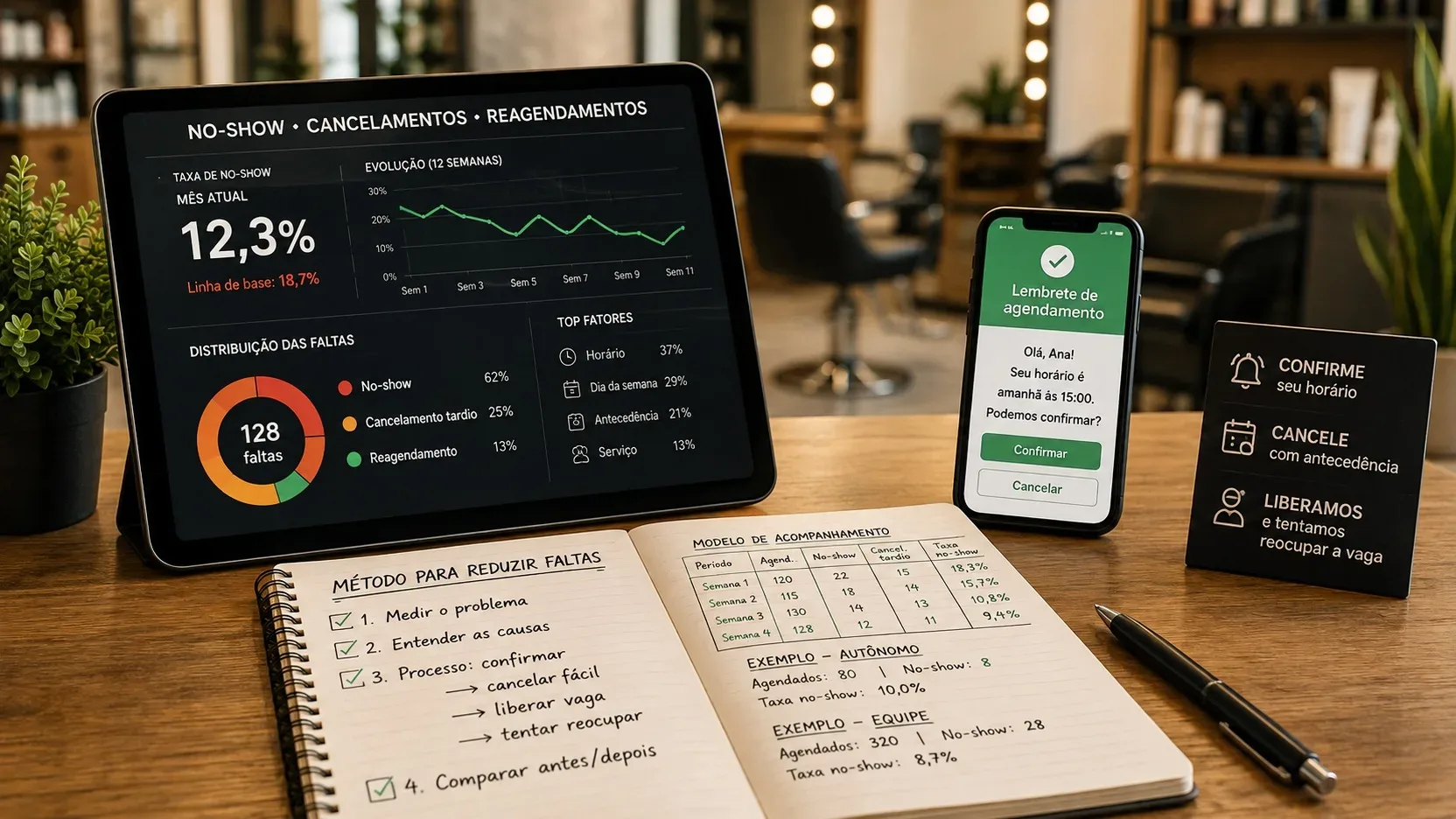
Absences are not a single problem. When a client doesn't show up without warning, when they cancel too close to the time and when they ask to reschedule in advance, the effect on the schedule is different. If everything goes into the same account, the indicator stops showing where the process is actually failing.
The most useful way to reduce lost schedules is to treat no-shows as an operational process: define the events, measure a baseline, observe patterns, confirm the schedule at a time that still allows for reaction, facilitate cancellation, release the vacancy immediately and try to refill it. Then, compare the result with the previous period using exactly the same rules.
First, separate no-show, late cancellation and rescheduling
In this method, a no-show is an appointment that arrived at the scheduled time and the client did not show up or notify us in time. Late cancellation is cancellation made after a window of notice defined by the business. Rescheduling is a change to another time, but it needs to be classified according to when it occurred: before or after that same window.
The window can be 24 hours, 12 hours or another interval consistent with the type of service. The important thing is not to change the rule in the middle of the measurement. A 30-minute haircut may be easier to reoccupy than a three-hour procedure. If the business uses different windows per service, this needs to be recorded in the spreadsheet.
It is also worth separating cancellation in advance from late cancellation. Early cancellation is not desirable, but it usually gives the business back the chance to sell the time. Late cancellation usually leaves less time to recover the capacity that was reserved.
This distinction avoids false improvement. If the no-show rate drops, but late cancellations rise at the same rate, the problem has changed its name, not necessarily its impact.
Define the denominator before calculating the rate
There is no single mandatory formula for all service businesses. The most common mistake is to use one denominator in January, another in February and then compare the percentages as if they were equivalent.
A simple convention is to create the eligible appointments category. It includes timeslots that remained active until the cutoff window and ended as completed service, no-show or late cancellation. Cancellations and reschedulings made before the window are outside this main basis, because they returned the schedule early enough to attempt reoccupation.
The no-show rate looks like this: number of no-shows divided by the number of eligible appointments, multiplied by 100.
The late cancellation rate uses the same denominator: late cancellations divided by eligible appointments, multiplied by 100.
To see the combined impact, also calculate the interruption rate: no-shows plus late cancellations, divided by eligible bookings, multiplied by 100.
Finally, monitor the reoccupancy rate: vacancies actually filled after a cancellation or rescheduling divided by the total vacancies released that could be offered again. This indicator shows whether the business only receives cancellations or whether it is able to transform part of them into new service opportunities.
Set up a baseline before changing the process
Before installing new reminders or tightening rules, record how your calendar works today. A small team with high volume can get a useful foundation in four weeks. A self-employed professional with few weekly appointments may need six to eight weeks to not draw conclusions based on two or three isolated cases.
The baseline must use the same definitions that will be used later. Record how many appointments were eligible, how many were no-shows, how many were canceled late, how many spots were released in advance, and how many of those spots were reoccupied.
You don't need to start with a complex tool. A simple spreadsheet allows you to discover whether absences are concentrated in certain services, days, times or intervals between reservation and service.
Record template for spreadsheet
Create a line by appointment. The most useful columns are: appointment identifier, scheduled date and time, date on which the reservation was made, service, professional, duration, advance between reservation and service, time at which the reminder was sent, response to confirmation, time of cancellation or rescheduling, final result, reason voluntarily informed by the customer, time at which the vacancy became available again and indication of reoccupancy.
Add a column called eligible for the no-show rate and fill it in with yes or no according to the defined rule. This avoids recalculating the base differently each month.
Illustrative example of registration: A001; 08/18/2026 at 2pm; court; reservation made six days in advance; reminder sent 26 hours in advance; customer confirmed; attended; eligible yes.
Another example: A002; 08/18/2026 at 3pm; manicure; reservation made twelve days in advance; reminder sent 25 hours in advance; no response; client did not show up; no-show; eligible yes.
Third example: A003; 08/18/2026 at 4pm; brush; reservation made three days in advance; customer canceled 30 hours before; vacancy released; another client occupied the slot; eligible not; reoccupied yes.
The examples are not a table of goals. They show how to record the route at each time so that the diagnosis comes from the business's own data.
Segment to find out where the rate is concentrated
After baseline, compare groups. Start by service, day of the week, time range and advance booking. If there is a team, include a professional or unit just to understand the process, not to transform the analysis into a blame ranking.
Booking in advance deserves special attention. You can group schedules into ranges such as up to two days, three to seven, eight to fourteen and over fourteen days. These ranges are a starting point, not a universal rule. Adjust them to the volume of the business.
A pattern does not prove causation. If Saturday afternoon features more no-shows, that doesn't automatically mean Saturday customers are less committed. There may be reservations made further in advance, longer services, confirmation sent at a bad time or a different audience. Use segmentation to formulate hypotheses and then see if a specific change changes the outcome.
When the customer spontaneously informs you why they canceled or missed, record the reason in simple categories, such as forgetfulness, unforeseen circumstances, transportation, scheduling conflict or personal problem. There is no need to pressure the person for a justification. The goal is to improve the process, not create friction after the problem.
Design a confirmation flow that still leaves time to react
Confirmation must begin at the time of booking. The customer needs to receive a date, time, service, professional when applicable, location and a simple way to change or cancel. This first message reduces misunderstandings and creates a reference that can be consulted later.
The second contact must occur before the cancellation window. For many services, a reminder between 24 and 48 hours in advance is a reasonable starting point. Controlled trials in other care settings show that text reminders can reduce absences, although the effect size varies. Studies also indicate that more than one reminder may work better than just one in certain scenarios.
The reminder needs to allow action. Instead of just sending You have time tomorrow, ask for a simple answer and offer an awkward way out. A possible text is: Your appointment is scheduled for tomorrow at 3pm. Can you confirm? If you can't make it, let us know via this channel so we can free up the space.
If the system allows it, the confirm, reschedule and cancel buttons reduce steps. If the process is manual, short answers such as YES or CANCEL already fulfill a similar function.
An additional same-day reminder can help with services scheduled well in advance, but it should not be the first opportunity to cancel. When the only one
message arrives two hours early, the business even finds out that the customer won't be coming, but barely has time to sell the appointment.
Don't turn lack of response into automatic cancellation
A customer who did not respond to the reminder is not necessarily a customer who gave up. Releasing the vacancy automatically without a previously accepted rule may create conflict and double booking.
Treat unconfirmed status as a sign of attention. In a manual schedule, this may generate a short second contact attempt. In a system, it may appear as a filter for reception to review the following day's schedules.
If the business wishes to automatically cancel unconfirmed reservations, this condition needs to be clear at the time of scheduling and consistent with the experience it intends to offer. For most small businesses, starting with confirmation and ease of cancellation tends to generate less friction than starting with punishment.
Make cancellation easy enough to arrive before the no-show
A customer who realizes that they will not be able to attend needs to be able to notify them quickly. If canceling requires calling, waiting for a response, explaining the reason and negotiating another time, some people tend to postpone contact.
The ideal process transforms a change of plan into an operational signal. As soon as the customer cancels or reschedules, the time is returned to the calendar and enters the recovery flow.
Current scheduling systems tend to separate confirmation, cancellation and no-show statuses, in addition to allowing automatic notifications and changes by the client themselves. The technological resource helps, but the logic can be applied manually with WhatsApp, calendar and spreadsheet as long as someone is responsible for updating the status immediately.
Release the vacancy and try to reoccupy it at the same time
Receiving the cancellation is only half the process. The second half is to reduce the time between release and appointment offering.
Keep a list of people who have agreed to be notified if a vacancy arises in advance. Register desired service, possible days and time slots. When a slot appears, offer it to people who are compatible with that duration and availability first.
Current scheduling tools already use waiting lists to fill gaps caused by cancellations and rescheduling. In manual operation, the same logic works with an organized list and a short message. The important thing is that the attempt to reoccupy begins when the seat is freed up, not when someone notices the empty seat hours later.
Measure the result. If ten vacancies were released and four were filled, the reoccupancy rate was 40%. With this number, it is easier to decide whether it is worth improving the waiting list, extending the notice to customers or adjusting the reminder in advance.
Recover the customer after an absence without normalizing the problem
When no-show occurs, record the status on the same day. Then, send a neutral and short message. The objective is to find out if there was an unforeseen event, offer a new time when it makes sense and make the rules clear for future bookings.
One possible approach is: We missed you at today's time. If something unforeseen happened, we can check a new date. For upcoming appointments, if you need to change, please let us know as soon as possible so we can free up the space.
For customers with a recurring history of absences, the process may change. Rather than making booking difficult for everyone, apply additional measures only where the risk and cost justify it. Long services, busy schedules or repeated no-shows may require enhanced confirmation, deposit, prepayment or other previously informed policy.
If you choose to charge, deposit or retain value, treat this as a separate commercial policy, presented before booking confirmation and appropriate to the rules applicable to your business and payment method. The proposal here is not to use a fine as a first response, but rather to protect the agenda without unnecessarily increasing friction for those who normally attend.
Example for a self-employed professional
Imagine a barber who works alone and registers around twenty appointments per week. She starts measuring six weeks and notices that no-shows are concentrated in reservations made more than ten days in advance. Also note that almost all cancellations arrive on the same day.
Instead of requiring a deposit from all customers, it changes three points. It now sends confirmation immediately after booking, sends a reminder 30 hours in advance with the option to cancel via message and maintains a simple list of customers who accept bookings. During the test, it continues to record no-show, late cancellation and reoccupancy with the same settings.
If no-shows fall, but late cancellations increase, it does not end the analysis. The next adjustment may be to bring the reminder forward by 36 or 48 hours. If vacancies begin to be refilled, the process is already reducing the impact even before the absence rate reaches the desired level.
Example for a small team
Now imagine a salon with four professionals and one person at the reception. The problem is not just remembering customers, but ensuring that everyone records results in the same way.
The team defines a single 24-hour window for common services and a larger window for long procedures. At the end of each day, reception reviews the schedules for the following day, monitors those who have not yet confirmed and maintains the centralized waiting list. Each completed service receives a final result in the system: attended, no-show, late cancellation, early cancellation or rescheduling.
Once a week, the manager observes the percentages per service, time slot and advance booking. If a professional has more incidents, first check whether he concentrates on long services, new clients or schedules that are longer in advance. Comparison is only useful when it takes into account the operational context.
Compare before and after without changing the ruler
After deploying the new flow, use a period comparable to the baseline. Compare the no-show rate, late cancellation rate, interruption rate and reoccupancy rate. Also look at the absolute number of bookings, as a percentage drop could simply be the effect of changes in volume.
Avoid changing reminders, cancellation windows, signal policies and waiting lists at the same time. When many things change together, you know the outcome has changed, but you can't identify which adjustment helped.
A more useful test introduces a major change, keeps the definitions stable, and measures over a few weeks. Then, keep what worked and move on to the next point in the process.
The right indicator is not just less no-show
The ultimate goal is to reduce lost productive hours without making booking tiring. Therefore, the no-show fee must be read together with late cancellation, advance notice and reoccupancy.
A good process does not try to prevent any cancellation. It encourages customers who won't be able to attend to give advance notice, transforms this information into an available spot and quickly offers the appointment to someone else.
When the agenda starts to record each stage, the discussion stops being customers who are missing a lot and becomes a measurable question: where the absences are concentrated, how many are anticipated by confirmation, how many vacancies are recovered and which change really improved the result. It is this sequence that allows us to reduce losses without complicating the experience for those who just want to make an appointment and show up.